How Do PDFs Preserve Formatting? A Complete Guide to Fonts, Layout, Images, and More
I have had a lot of trouble with documents in the past. I will create a document in Microsoft Word or Google Docs. Then I will open it on a different computer. But when I do that the fonts will be different and the spacing will be off. The pages will look completely different. Preserve Formatting
This is one of the reasons that PDFs are so useful.
When I save a document as a PDF I expect it to look the same on my laptop, phone, tablet or computer. The heading should stay where I put it. The images should stay in the place. The tables should not jump to another page.
How do PDFs actually do this?
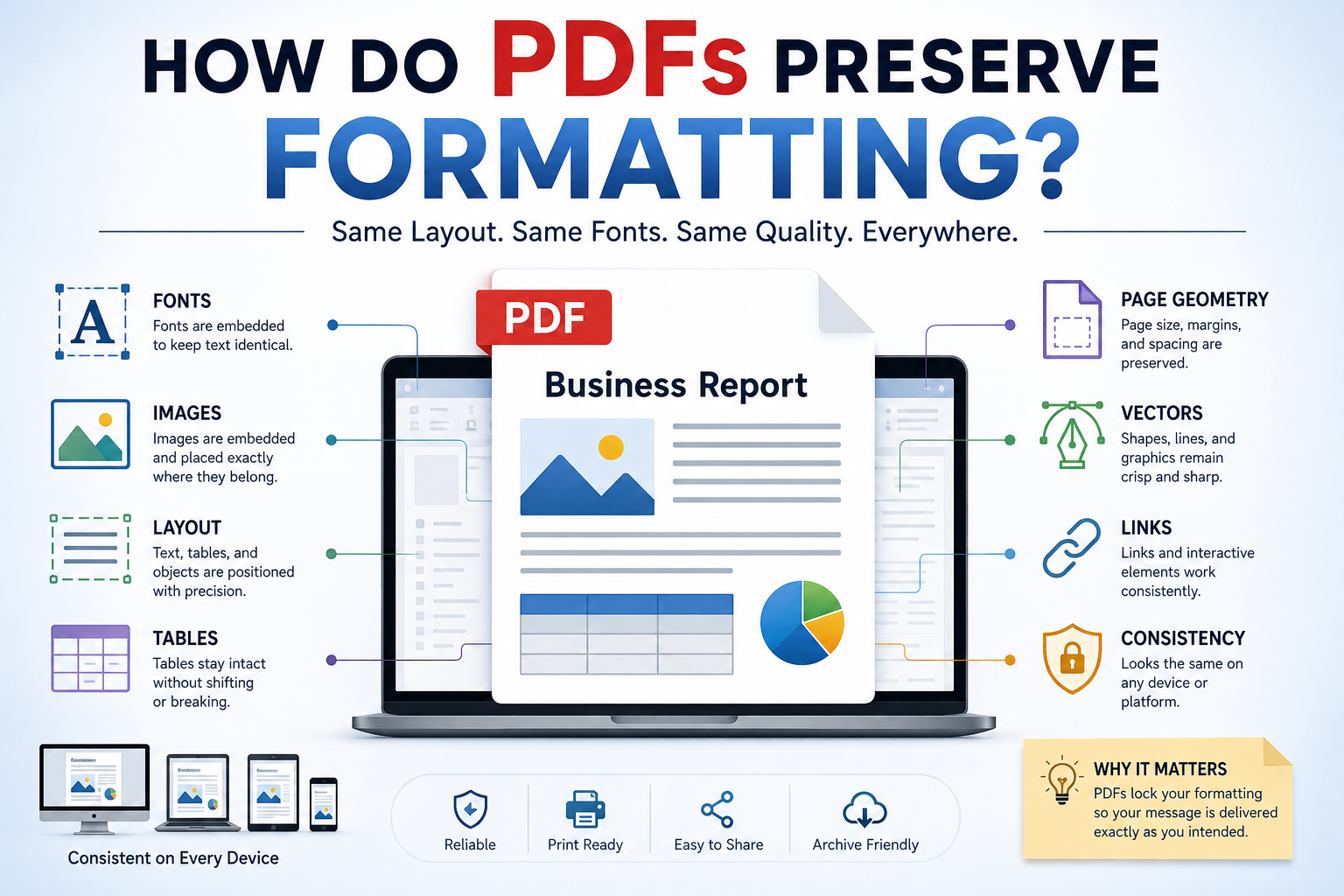
It is not that PDFs "lock" a document. A PDF stores information about what the page looks like. This includes the text, the fonts, the images, the graphics and the coordinates. When a PDF viewer opens the file it uses this information to show the page. It does not try to rebuild the document like a word processor would.
PDF is also a format, which is why PDFs look the same on different software and operating systems. Preserve Formatting
In this guide I will explain how PDFs keep the formatting the same, why the fonts are important, what can cause problems with the formatting and which PDF tools I like to use when I work with PDFs. I will talk about PDFs a lot because PDFs are the topic of this guide.
What Does "Preserving Formatting" Mean?
When I talk about PDF preserving formatting I'm really talking about preserving the structure of a document.
That includes things such as:
- Font type
-
Font size
-
Bold and italic styling Preserve Formatting
-
Text position
-
Line spacing
-
Paragraph placement
-
Page margins
-
Headers and footers
-
Images
-
Tables
-
Shapes
-
Colors
-
Page size
-
Page numbers
-
Links
-
Drawings and graphics
Imagine that I create a five-page report.
I place a title at the top, add a table underneath it, insert a company logo in the corner and position paragraphs around the page.
When I export that document to PDF the PDF doesn't simply remember that I wrote "add a table " It stores instructions and resources that allow the viewer to reproduce the page's appearance. That's why the same PDF can generally look very similar across devices.
How Does a PDF Preserve Formatting?
The easiest way for me to explain this is to break the process into parts.
1. PDFs Store Text With Position Information
One difference between a word-processing document and a PDF is how the content is handled. Preserve Formatting
A word processor is designed around document structure. It can reflow paragraphs, adjust spacing, change line breaks and move content when something changes.
A PDF is more focused on reproducing the finished page.
Text in a PDF is associated with information that tells the viewer how and where it should be rendered. In terms the PDF can describe things such as:
- Put this text here, use this font, use this size and render these characters at these positions.
-
That makes the page less dependent on the software originally used to create it.
-
This is one reason a PDF can maintain its appearance when you send it to another person.
2. Fonts Play a Role
If you remember only one thing from this article remember this:
- Fonts are one of the biggest reasons formatting can change.
-
Suppose I create a document using a font that exists only on my computer.
I convert it to PDF. Send it to someone else.
If the necessary font information isn't available to the PDF viewer the software may have to substitute another font. That substitution can change text width, line wrapping, spacing and sometimes even the overall page structure.
Technical guidance for PDF submissions specifically recommends embedding fonts because font substitution can affect a document's appearance and structure.
This is why properly created PDFs often embed the fonts or appropriate subsets of the fonts used in the document. Preserve Formatting
For example if I use a typeface, for a heading the PDF can contain the information necessary to reproduce those characters instead of assuming that every computer already has that font installed.
For long-term preservation PDF/A standards go further by requiring fonts used for rendering to be embedded.
What Happens When Fonts Are Embedded?
Let us say I create a document using a font called "Example Sans."
The document can have the font information inside the PDF file.
This is different from telling the PDF to use "Example Sans."
Sometimes we do not need the font.
If my document only uses characters from the "Example Sans" font then only those characters are added to the PDF file.
This helps keep the PDF file small. Preserve Formatting
The text still looks correct when we open the PDF file.
This is very important when we use PDF files for things like:
-
Legal documents
-
Invoices
-
Certificates
-
Academic papers
-
Government forms
-
Business reports
-
Printed documents
-
Archival documents
When the way something looks is important then the way we handle fonts is also important.
3. PDFs Preserve Page Geometry
There is another reason why PDF files keep their formatting.
PDF pages have set dimensions and coordinates. Preserve Formatting
We can think of a PDF page like a piece of paper.
By just saying where something goes, like "this heading comes after the paragraph" the PDF file can remember exactly where everything is on the page.
This is true for things like:
-
Images
-
Text blocks
-
Lines
-
Tables
-
Logos
-
Shapes
-
Page numbers
This makes PDF files very good for documents where we need to control where things are. Preserve Formatting
For example, think about a certificate.
If I put someone's name under a fancy title I want it to stay there when someone else opens the file. The way PDF files are set up helps keep everything looking the way it should which's important for PDF files and for the "Example Sans" font and other fonts, like it.
4. Images Are Stored Separately From Text
Images are a part of keeping the format of a document looking good.
When I add a picture, logo or drawing to a PDF the PDF stores the image separately from the text.
The PDF also stores information about how the image should look on the page.
This includes things like: Preserve Formatting
-
Position
-
Dimensions
-
Resolution
-
Color
-
How it is transformed
-
How it is compressed
This is why an image stays in place even when I open the PDF on a different device. But there is something to remember:
Preserving the format of a document does not always mean the image looks exactly the same.
If I make the PDF smaller by compressing it the image might not look as good even if it is in the place.
- So there are two things to think about:
-
Did the PDF keep the layout looking good?
-
Did the PDF keep the image looking its best?
The answers to these questions can be different. Preserve Formatting
5. Vector Graphics Help Preserve Shapes and Lines
PDFs can have more than text and pictures. They can also have vector graphics.
These are really useful for things like:
-
Logos
-
Charts
-
Diagrams
-
Icons
-
Lines
-
Shapes
-
Drawings
Vector graphics are different from pictures because they use math to draw the shapes.
This means that when I zoom in on a line it stays sharp and does not get blurry.
This is one reason why PDFs are often used for printing and technical documents that need to look professional. Preserve Formatting
6. PDFs Preserve Page Size and Margins
Page dimensions are really important for consistency. PDFs can define the size of a page like A4 or Letter or Legal or A3 or even a Custom size.
It also keeps the content in the place on the page. This is really important when I print something out. If I make an invoice for A4 paper I do not want the content to change when the recipient opens it on their computer.
The page is like a fixed canvas that I can work with.
Why Do Not PDFs Change Like Word Documents?
This is a way to understand the difference between PDFs and word documents. Let us say I have a paragraph in a word processor. If I change the font size from 12 to 14 the paragraph gets longer. Preserve Formatting
- The next paragraph moves down.
-
The page break changes too.
-
A table may even move to another page.
This is what word processors are supposed to do: they change the content to fit.
PDFs are different; they want to keep the result looking the same.
That is why PDFs are great for sharing documents that are finished. They are not always easy to edit like the original document. PDFs are good for things, like invoices and receipts because PDFs keep the page size and margins the same.
I like using PDFs because PDFs preserve the visual result, which is what I want when I share documents. Preserve Formatting
Can PDFs ever lose their formatting?
Yes.
PDFs are not magically immune to formatting problems.
Several things can cause differences in PDFs.
There are reasons why PDFs can have formatting issues.
One reason is missing fonts
If the fonts were not properly embedded in the PDF a viewer may substitute another font when you view the PDF.
Another reason is conversion
A designed PDF converter can alter the spacing, images, tables or page breaks in the PDF.
Scanned documents can also be a problem
A scanned PDF is essentially a collection of page images than editable text, which can cause formatting problems.
Compression is another thing that can cause issues with PDFs
Aggressive compression can reduce the image quality in the PDF.
PDFs, with layouts can also be a problem. Preserve Formatting
Documents that contain fonts, complicated tables, layered graphics or unsupported elements may not convert perfectly to a PDF.
When I edit an existing PDF the editor may reconstruct portions of the PDF then modify it exactly like the original source file, which is the PDF.
So if the formatting of the PDF is critical I always recommend checking the PDF before sending or printing the PDF.
My Advice for Preserving PDF Formatting
If I want my PDF to look the same for everyone I follow simple rules.
First I always check the fonts
Before I export the PDF I make sure I am using fonts and that the PDF creation process handles font embedding correctly. Preserve Formatting
check the PDF
I do not assume that the export worked perfectly.
I open the PDF and check the headings,
-
tables,
-
Images,
-
page breaks,
-
fonts, margins and
-
page numbers.
I also do not over-compress the PDF. If the PDF contains photographs or detailed graphics, compressing it can make the document look worse.
keep the source file
A PDF is great for sharing. I do not treat it as a replacement for my editable source document.
If I create a report, in Word for example I keep the Word file and use the PDF as the final version that I share with others.
use PDF/A when long-term preservation matters
For archival documents PDF/A is worth considering because it is designed for long-term preservation and consistent rendering of PDFs. Preserve Formatting
E-E-A-T: What Should a Trustworthy PDF Guide Explain?
When I write about PDF technology, I don't think simply listing tools is enough.
A useful guide should explain why PDFs behave the way they do, not just tell readers which button to click.
That's why I have focused here on the technical foundations:
- Fonts
-
Positioning
-
Page geometry
-
Images
-
Vector graphics
-
Compression
-
Conversion
-
Long-term preservation
These details matter because they explain the real reason PDFs are so reliable for document sharing.
I also recommend checking technical documentation and standards when the document has legal, archival, regulatory, or professional importance. PDF is an ISO-standardized format, and font handling is specifically addressed in technical PDF guidance.
Frequently Asked Questions
1. Why do PDFs keep the same layout?
PDFs are designed to preserve the visual appearance and positioning of page content. They store information about text, fonts, graphics, images, and their placement so PDF viewers can reproduce the page.
2. Do PDFs preserve fonts?
They can. Properly created PDFs can embed fonts or font subsets, which helps prevent font substitution. Font embedding is especially important when consistent appearance matters.
3. Why does my PDF sometimes look different?
The most common reasons include missing fonts, poor conversion, unsupported document elements, image compression, or changes made during PDF editing.
4. Can a PDF preserve image quality?
Yes, but it depends on how the PDF was created and compressed. A PDF can preserve high-quality images, but aggressive compression can reduce image quality.
5. Does PDF preserve page size?
Yes. PDF pages can define specific dimensions such as A4, Letter, Legal, or custom sizes.
6. Why is PDF better than Word for sharing?
Word documents are designed to be edited and reflowed. PDFs are designed more around preserving the finished appearance of a document. That's why I generally prefer PDF when I want someone else to view or print a document exactly as intended.
7. Can I edit a PDF without changing its formatting?
Sometimes. Simple edits may work well, but complicated PDFs can be difficult to modify perfectly because the PDF is designed around the final page appearance rather than the original document's editable structure.
8. Does converting Word to PDF always preserve formatting?
Not always. Most modern converters handle common documents well, but complex fonts, tables, graphics, or unusual layouts can still produce differences.
9. What is PDF/A?
PDF/A is a specialized version of PDF designed for long-term document preservation. Its requirements are intended to make future rendering more consistent and independent of the original software environment.
10. Should I compress a PDF?
Yes, if the file is unnecessarily large. But I wouldn't automatically use the strongest compression setting. If the document contains detailed images, I would check the final quality before sharing it.
Why PDFs Are So Good at Formatting
When I first think about a PDF it is easy to imagine it as just a document that has been locked.
That is not really the correct way to explain it.
A PDF keeps the formatting because it has information that tells how the pages should look when they are printed or shown on a screen. Fonts, where the text is placed, images, drawings, the size of the pages and other visual parts all come together to show the document exactly as it was meant to be.
Fonts are very important. If the right font is not there the look of the document can change. This can also change how the document is structured.
That is also why PDFs are so helpful, for invoices, reports, certificates, contracts, forms,research papers, presentations and other documents where the way they look's important.